Friday, September 18, 2009

post code snippets in google blogger

Howdy folks, here's some code:

def myfunc(*args, **kwargs):
    for arg in args:
        print arg
    for k,v in kwargs.items():
        print k,v 

First thing you need to do is make sure you're useing the Google Blogger's "Updated Editor".
  1. Log into Blogger, and from the Dashboard goto Settings.
  2. On the Settings tab, down towards the bottom under "Global Settings"
  3. "Select post editor" - "Updated editor"

The updated editor actually solved a lot of the "problems" I was having with pre formatted text getting messed up when I went back and forth between compose and edit html.

But to post some really good looking source code you have to use SyntaxHighlighter.

SyntaxHighlighter is written in JavaScript, and there some css styling as well. To use SyntaxHighlighter on your google blogger page, you have to edit the template.

Under the Layout tab, go to "Edit HTML"
In the "Edit Template" box, scroll down toward the bottom.
You want to add the .js/.css references just before the last closing head tag (</head>):

<link href='http://alexgorbatchev.com/pub/sh/current/styles/shCore.css' rel='Stylesheet' type='text/css'/>
<link href='http://alexgorbatchev.com/pub/sh/current/styles/shThemeDefault.css' rel='Stylesheet' type='text/css'/>
<script src='http://alexgorbatchev.com/pub/sh/current/scripts/shCore.js' type='text/javascript'/>
<script src='http://alexgorbatchev.com/pub/sh/current/scripts/shBrushXml.js' type='text/javascript'/>
<script src='http://alexgorbatchev.com/pub/sh/current/scripts/shBrushPlain.js' type='text/javascript'/>
<script src='http://alexgorbatchev.com/pub/sh/current/scripts/shBrushCpp.js' type='text/javascript'/>
<script src='http://alexgorbatchev.com/pub/sh/current/scripts/shBrushJScript.js' type='text/javascript'/>
<script src='http://alexgorbatchev.com/pub/sh/current/scripts/shBrushJava.js' type='text/javascript'/>
<script src='http://alexgorbatchev.com/pub/sh/current/scripts/shBrushPhp.js' type='text/javascript'/>
<script src='http://alexgorbatchev.com/pub/sh/current/scripts/shBrushPython.js' type='text/javascript'/>
<script src='http://alexgorbatchev.com/pub/sh/current/scripts/shBrushRuby.js' type='text/javascript'/>
<script src='http://alexgorbatchev.com/pub/sh/current/scripts/shBrushSql.js ' type='text/javascript'/>

SyntaxHighlighter makes it easy to copy the above snippet - just hover over the code, and click the "copy-to-clipboard" icon:


Then at the very bottom, you also want to set some global parameters just before the last closing body tag (</body>):

<script language='javascript'>
SyntaxHighlighter.config.bloggerMode = true;
SyntaxHighlighter.config.clipboardSwf = 'http://alexgorbatchev.com/pub/sh/current/scripts/clipboard.swf';
SyntaxHighlighter.all();
</script>


 You can then make highlighted code by wrapping your code snippet's in a
<pre> tag with a specially formatted "class" attribute, like this:

<pre class="brush:js">
alert("Hello world");
</pre>

Result:

alert("Hello world");

You can add brushes for different languages by adding more JavaScript files to your Template. The author hosts the most recent version here:
http://alexgorbatchev.com/pub/sh/current/

N.B. Just because you put html inside a  <pre> tag doesn't magically make html parsers know you're try to post literal HTML code - you still have to escape valid HTML using &lt; and the like or it won't be rendered correctly.  Try something like this.

I cobbled together the following steps from these sources:
SyntaxHighlighter Homepage
Using SyntaxHighlighter on BLOGGER
Publish Source code in Blogger
Syntax Highlighter NOT working in my googleblog

Wednesday, September 16, 2009

Newegg Shipping Halo: ODST early

I pre-ordered from Newegg, and it arrived Monday Sept 14th.

Play'd it through the first night on Heroic (6 hours).
It was fun.
No dual wielding.
No battle rifle.
You move surprisingly fast with a turret.
No match-making for firefight (yet?).

Halo: Mythic is a separate disk, with:
  • Matchmaking
  • Custom Games
  • Theater
  • Forge
...and ALL the multilayer maps.

Heretic is Midship.
Cathedral is like Epitaph, but VERY symmetrical.
Longshore seems pretty cool.

You play them off Mythic, you don't download them to your HD. Your Halo3 saved content is available from with-in Mythic automatically.

Friday, August 14, 2009

TypeError: dict objects are unhashable

My mom told me to update my blog. Hi mom.

I've been wanting to write this one for awhile anyway.

In retrospect it was rather naive - but I wonder who hasn't at one time tried to create a set of dictionaries:

|
>>> parts = [
|... {'id':1, 'desc':'widget', 'detail':'rear widget'},
|... {'id':1, 'desc':'widget', 'detail':'front widget'},
|... {'id':2, 'desc':'gear', 'size':4},
|... {'id':3, 'desc':'cog', 'type':'green'},
|... ]
|>>> myset = set(parts)
|Traceback (most recent call last):
| File "", line 1, in ?
|TypeError: dict objects are unhashable


What did I expect it to do? I think the first time I tried this it seemed more reasonable. I think my list of dictionaries actually contained exactly the same keys, with some exact duplicates and I needed to uniquify the list. I acctually ended up doing something like the example at the bottom...

Dict objects are not hashable, read about hash tables and sets if it isn't obvious why it's important that objects in a set support a __hash__ method.

A hash function is really simple idea:
two equal objects MUST return the same hash
two un-equal objects should RARELY return the same key

But there's no really obvious reasonable way to implement hash on a dictionary of arbitrary keys and values.

Here's a couple dumb ideas for adding a hash function to a dict:


|def __hash__(self):
| key = 0

|def __hash__(self):
| id = 0
| for pair in sorted(self.items()):
| id += hash(pair)
| return hash(id)


And they "work" - at least in the sense that they remove the error:

|
>>> class Part(dict):
|... def __hash__(self):
|... return self['id']
|...
|>>> myset = set([Part(x) for x in parts])
|>>> for part in myset:
|... print part
|...
|{'desc': 'widget', 'detail': 'rear widget', 'id': 1}
|{'desc': 'gear', 'id': 2, 'size': 4}
|{'type': 'green', 'id': 3, 'desc': 'cog'}
|{'desc': 'widget', 'detail': 'front widget', 'id': 1}


And that's great, if my parts list contained EXACTLY equal dictionaries they would be removed - I could turn it back into a list an continue on with everything uniquified! It might be worth nothing that the two parts with 'id' = 1 were not considered equal just because they returned the same hash. When there is a hash collision, the inhereited __eq__() method recognized that 'rear widget' != 'left widget' and that the two parts were distinct.

But what's really interesting what I've done by making a mutable object hashable...

It can be used as a dictionary key with surprisingly bad results:

|>>> part.__class__ # part is an instance of my Part class
|&ltclass '__main__.Part'>
|>>> part # a mutable object with a hash function
|{'desc': 'widget', 'detail': 'front widget', 'id': 1}
|>>> mydict = {} # mydict is a plain dictionary
|>>> mydict[part] = 1 # i can use part as a key!
|>>> part['id'] = 2 # I then modify the key
|>>> mydict[part] # there is no value assigned to this new "modified" key
|Traceback (most recent call last):
|File "", line 1, in ?
| KeyError: {'desc': 'widget', 'detail': 'front widget', 'id': 2}
|>>> mydict # or is there?
|{{'desc': 'widget', 'detail': 'front widget', 'id': 2}: 1}

Here's a fairly reasonable attempt at making a custom class that is mostly mutable dictionary, but has a safe and reasonable hash function. I'll also over-ridden __eq__ to ignore minor differences in the 'detail' between objects.


|>>> class Part(dict):
|... def __init__(self, part_dict):
|... if 'id' not in part_dict:
|... raise TypeError("Parts must have an id")
|... dict.__init__(self, part_dict)
|... def __setitem__(self, key, value):
|... if key == 'id':
|... raise ValueError("Part id's can't change - create a new part")
|... return dict.__setitem__(self, key, value)
|... def __hash__(self):
|... return self['id']
|... def __eq__(self, other):
|... a = self.copy()
|... del a['detail']
|... b = other.copy()
|... del b['detail']
|... return a == b
|...
|>>> for part in set([Part(x) for x in parts]):
|... print part
|...
|{'desc': 'widget', 'detail': 'rear widget', 'id': 1}
|{'desc': 'gear', 'id': 2, 'size': 4}
|{'type': 'green', 'id': 3, 'desc': 'cog'}

So if parts is a list of build materials, and you wanted to know how many distinct parts it takes to build this thing... the above Part class might be the right track. Aside from the ambiguity of added by over-riding "==" like that... dose anyone see any other problems with this?

Thursday, February 5, 2009

pymssql and sqlalchemy

At the time of this writing the latest version of sqlalchemy (0.5.2) does not support the recent re-write of pymssql (1.0.0), which was released last week.


attempting to create a sqlalchemy engine object will result in an exception:

File "/lib/python2.5/site-packages/SQLAlchemy-0.5.2-py2.5.egg/sqlalchemy/databases/mssql.py", line 1294, in create_connect_args
self.dbapi._mssql.set_query_timeout(self.query_timeout)
AttributeError: 'module' object has no attribute 'set_query_timeout'
>>>

According to the pymssql news page, the low level module in this major version release is not backwards compatible:

  • BEWARE however, if you were using the lower level _mssql module, it changed in incompatible way. You will need to change your scripts, or continue to use pymssql 0.8.0. This is why major version number was incremented.
As a 'work-around' you can always install an older stable version of pymssql (0.8.0)

$easy_install pymssql==0.8.0

Tuesday, January 6, 2009

Quake Live Beta Invites Crash Test

I finally got my QuakeLive Closed Beta Account - and you may have too!

The QuakeLive Beta is warming up!
on Monday we're going to be sending out our largest number of new beta invites ever - hopefully more than doubling our current active player base.
- QuakeLive News


id is planning a big "crash test" on Wednesday afternoon - Jan 7th 2009. Go check your email, and be ready for a three part sign-up and activation rig-o-mo-rag...

id has asked us to "BRING THE HEAT"

Monday, December 29, 2008

Set PYTHONPATH

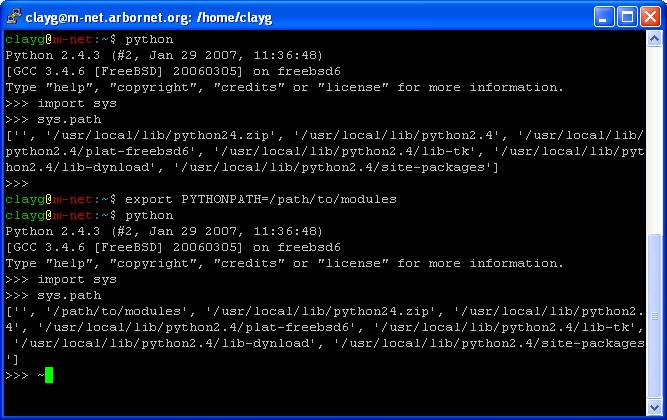
To set the enviornment variable PYTHONPATH in bash:
export PYTHONPATH=/path/to/modules

just setting PYTHONPATH=/path/to/modules won't work - you have to use export. If you want a variable passed on to a child processes it has to show up when you type 'env'

But since you used export - next time you start python, '/path/to/modules' will automatically be appended to the front of your sys.path


Obviously '/path/to/modules' should be the full path to whereever you're keeping your modules - something like /home/clayg/lib. (relative path's will work, but not ~/ , probably best to avoid both) You can separate multiple directories with a colon:

export PYTHONPATH=/path/to/modules:/path/to/other/modules

Setting python path is handy if, for example, you are using setuptools or distutils to install python modules on a system which you do not have root privileges.

Just download the source dist and find the directory with setup.py, then run:
python setup.py build

Then re-locate the folder with the __init__.py (usually ./build/lib/packagename) to your /path/to/modules folder.

if you want your PYTHONPATH to stick around - you should add it to .bashrc

import packagename should be good to go!

Thursday, December 4, 2008

get dates from excel with python xlrd

a1_as_datetime = datetime.datetime(*xlrd.xldate_as_tuple(a1, 0))

UPDATE: Please read the discussion of the second argument to xldate_as_tuple - "datemode" in the comments section of this post before using this example. It is LIKELY that hard-coding the "datemode" option will not meet your long term needs.

I had to piece this line together from two other articles, sorry don't remember which.


Full Example:

>>> import datetime, xlrd
>>> book = xlrd.open_workbook("myfile.xls")
>>> sh = book.sheet_by_index(0)
>>> a1 = sh.cell_value(rowx=0, colx=0)
>>> print "Cell A1 is ", a1
Cell A1 is 39811.0
>>> a1_as_datetime = datetime.datetime(*xlrd.xldate_as_tuple(a1, book.datemode))
>>> print 'datetime: %s' % a1_as_datetime
datetime: 2008-12-29 00:00:00
>>>


This might make more sense if you're familiar with xlrd - A Python module for extracting data from MS Excel ™ spreadsheet files.

If you are familiar with xlrd, then the only part really worth discussing is xldate_as_tuple, which will convert the float that excel is using to store the date as something more useful, like a tuple:
(2008, 12, 29, 0, 0, 0)

Note that the first argument to the xldate_as_tuple function is the variable I defined as a1. xldate_as_tuple will not accept a cell reference 'a1' or some such thing - you have to give it the float!

The datetime module has a constructor for dates that requires at minimum three positional arguments:
datetime( year, month, day[, hour[, minute[, second[, microsecond[, tzinfo]]]]])

This would also work:
a1_as_date = datetime.date(*xlrd.xldate_as_tuple(a1, 0)[:3])

You can pass the items of the tuple as positional arguments by prefacing the tuple with an asterisk (wtg python!)