Once you have your program running in Eclipse, at some point your going to want to share it. It is easy to do - despite all the tutorials about Java Web Start and jnlp .xml files - you don't need a web server. You can build an old fashioned platform specific .jar file very easily.
This tutorial is for SWT v3.3 (and above? I only test on Windows & Linux)
Under your workspace/myprojectname folder create a folder called "build"
under that make a folder for each OS you want to distribute, for example:
/home/clayg/workspace/LeftTabs/build/LeftTabs-linux
/home/clayg/workspace/LeftTabs/build/LeftTabs-winxp
Get your hands on the latest SWT release for the OS you're building for:
Linux - swt-3.3.1.1-gtk-linux-x86.zip
Windows - swt-3.3.1.1-win32-win32-x86.zip
Once you extract that archive you'll see a file called "swt.jar" right in the root - that's your platform specific implementation of all the SWT classes your neat little app is using. It has to go in the working directory of the .jar you're going to create for your application.
So copy the swt.jar from the linux release into:
/home/clayg/workspace/myprojectname/build/myprojectname-linux
and copy the swt.jar from the windows release into:
/home/clayg/workspace/myprojectname/build/myprojectname-winxp
(C:\Documents and Settings\clayg\workspace\myprojectname\build\myprojectname-[platform])
Then go into eclipse. Open your project, we're going to create a manifest for your application's java archive. The manifest tells the java runtime which class to execute and what classes it depends on (I'm pretty sure that's basically what it's doing?).
Right click on your project in the Package Explorer and select New -> File. Name it myprojectname-manifest.txt (LeftTabs-manifest.txt). Fill it with the following goodness:
Manifest-Version: 1.0
Class-Path: swt.jar
Main-Class: myprojectname
[blank line]
Replace myprojectname with the name of the class that contains your main method, which is hopefully also the name of the project, and also more than likely your one and only source file? Replace [blank line] with you guessed - a blank line. I tried it without the blank line, and you really do need it - LAME.
Now right click on your project again, and this time selected Export. In the wizard, under Java - pick "JAR File" and click Next. Your project should already be selected, under "Select the export destination:" click Browse next to "JAR File"
You want to create a file called myprojectname-[platform].jar under the folder:
/home/clayg/workspace/myprojectname/build/myprojectname-[platform]
so the first time I did this for the linux platform, I ended up with
/home/clayg/workspace/LeftTabs/build/LeftTabs-linux/LeftTabs-linux.jar
the second time, when I did this again for windows, I got:
/home/clayg/workspace/LeftTabs/build/LeftTabs-winxp/LeftTabs-winxp.jar
Click Next, make sure "Export class files with warnings" is selected, click Next again.
Now choose "Use existing manifest from workspace" and click Browse. Select the myprojectname-manifest.txt, click OK. Now just hit Finish to build your application.
You need the whole myprojectname-[platform] directory to run your app.
In windows:
double click the myprojectname-winxp.jar file
In linux open a console in the myprojectname-linux folder, and run:
$java -jar myprojectname-linux.jar
from the command prompt
In the process of building my LeftTabs application for windows, I discovered a bug that didn't show up when I was building it under Linux. I believe the end result is actually a more elegant solution.
Line 374:
text.addListener(SWT.FocusOut, new Listener()
{ ...
became:
text.addListener(SWT.Deactivate, new Listener()
{ ...
The purpose of this Listener was to trigger the Modify Event for the view Widget which would tell the main application that the data in the view should be written back to the selected item in the tree. I was doing this when Text item in the view LOST FOCUS. But apparently in windows this happens after the new item is selected in the Tree - which caused the data in the tree to loose sync with the data in the view.
Anyway, vivir es aprender, I didn't know an event SWT.Deactivate existed. Works great.
Monday, April 7, 2008

Wednesday, April 2, 2008
SWT Java - Left Hand Tabs - with Drag and Drop custom treeItem.setData()
I'm a month behind my planned development because I had to build the foundation of my application before I could even start.
Here's hoping someone else gets a head start.
LeftTabs.java is a simple expandable application based on the SWT Java framework that has a "list" of "items" on the left, and on the right a "view" that will display their data.

The list is implemented by a tree. You can assign your own custom data type to each treeItem. You can create new items with a right-click pop-up menu. You can delete or drag and drop any item in the tree. Your custom data associated with the treeItem will be meticulously preserved. You can update the data in the view on the right and the changes will be synced back to your custom data type in the selected treeItem - automatically.
It's not all that surprising that more templates like this aren't available. It was rather difficult to but together. But there was lots of resources that went into making this possible. Many elements in this code are based on examples taken from: www.java2s.com
/*
* Basic template for app with left hand tabs
* and custom pane on right
* by clay.dot.gerrard.at.gmail.dot.com
*/
import java.io.ByteArrayInputStream;
import java.io.ByteArrayOutputStream;
import java.io.DataInputStream;
import java.io.DataOutputStream;
import java.io.IOException;
import org.eclipse.swt.SWT;
import org.eclipse.swt.widgets.Composite;
import org.eclipse.swt.widgets.Display;
import org.eclipse.swt.widgets.Event;
import org.eclipse.swt.widgets.Listener;
import org.eclipse.swt.widgets.Menu;
import org.eclipse.swt.widgets.MenuItem;
import org.eclipse.swt.widgets.Shell;
import org.eclipse.swt.widgets.Text;
import org.eclipse.swt.widgets.Tree;
import org.eclipse.swt.widgets.TreeItem;
import org.eclipse.swt.graphics.Point;
import org.eclipse.swt.graphics.Rectangle;
import org.eclipse.swt.widgets.MessageBox;
import org.eclipse.swt.dnd.*;
import org.eclipse.swt.layout.*;
public class LeftTabs {
// left hand "tab" tree
static Tree tree;
// right hand viewer
static CompositePane view;
// temporary TreeItem used to hold data during Drag & Drop
static TreeItem sourceTreeItem;
// keep track of number of treeItems created
static int count = 1;
public static void main(String[] args) {
// setup the display & shell & layout
final Display display = new Display();
final Shell shell = new Shell(display);
FillLayout fillLayout = new FillLayout();
// columns
fillLayout.type = SWT.HORIZONTAL;
// break 'em up a little
fillLayout.spacing = 3;
fillLayout.marginHeight = 3;
shell.setLayout(fillLayout);
// And here's the tree
tree = new Tree(shell, SWT.BORDER);
// filled with some data
for (int i = 1; i <= 3; i++) {
TreeItemData myData = new TreeItemData();
myData.Name = "Item" + i;
myData.field1 = myData.Name + " Data";
TreeItem item = new TreeItem(tree, SWT.NONE);
count++;
item.setText(myData.Name);
item.setData(myData);
}
// And here's the right hand pane
view = new CompositePane(shell);
// right click menu on the tree
tree.addListener(SWT.MenuDetect, new Listener() {
public void handleEvent(Event event) {
Menu menu = new Menu(shell, SWT.POP_UP);
// NEW ITEM
MenuItem item_new = new MenuItem(menu, SWT.PUSH);
item_new.setText("New Item");
// when click "New Item", add an item to tree
item_new.addListener(SWT.Selection, new Listener() {
public void handleEvent(Event e) {
TreeItem[] selection = tree.getSelection();
int index;
if (selection.length != 0)
index = tree.indexOf(selection[0]) + 1;
else
index = 0;
TreeItem item = new TreeItem(tree, SWT.NONE, index);
TreeItemData myData = new TreeItemData();
myData.Name = "Item" + count++;
myData.field1 = myData.Name + " Data";
item.setText(myData.Name);
item.setData(myData);
view.setData((TreeItemData) item.getData());
tree.setSelection(item);
}
}); // end item_new event
// DELETE ITEM
MenuItem item_delete = new MenuItem(menu, SWT.PUSH);
item_delete.setText("Delete Item");
// when click "Delete Item", delete selected item
item_delete.addListener(SWT.Selection, new Listener() {
public void handleEvent(Event e) {
TreeItem[] selection = tree.getSelection();
int index = tree.indexOf(selection[0]);
for (int i=0; i < selection.length; i++){
selection[i].dispose();
}
// item deleted need new selection
TreeItem[] items = tree.getItems();
if (items.length != 0) {
if (index > items.length-1) {
// it would be better to select an item closer to the deleted item?
view.setData((TreeItemData) items[items.length-1].getData());
tree.setSelection(items[items.length-1]);
} else {
view.setData((TreeItemData) items[index].getData());
tree.setSelection(items[index]);
}
}
}
}); // end item_delete
menu.setLocation(event.x, event.y);
menu.setVisible(true);
while (!menu.isDisposed() && menu.isVisible()) {
if (!display.readAndDispatch())
display.sleep();
}
menu.dispose();
}
}); // end right click menu
// when a new treeItem is selected, update the view
tree.addListener(SWT.Selection, new Listener() {
public void handleEvent(Event event)
{
view.setData((TreeItemData) event.item.getData());
}
}); // end update view with tree item data
// when the tree looses focus make sure things are in order
tree.addListener(SWT.FocusOut, new Listener() {
public void handleEvent(Event event) {
TreeItem[] selection = tree.getSelection();
// no item selected - view data is ambigous, possible data loss
if (selection.length == 0) {
MessageBox messageBox = new MessageBox(shell, SWT.ICON_ERROR);
messageBox.setText("Possible Loss of Data.");
messageBox.setMessage("Think about what you did to cause the view data and the tree selection to get out of sync, and decide how you want your program to behave!");
messageBox.open();
//*/
TreeItem[] items = tree.getItems();
if (items.length != 0) {
view.setData((TreeItemData) items[0].getData());
tree.setSelection(items[0]);
} else {
// no items in view?! you can't delete the last item...
TreeItemData myData = new TreeItemData();
myData.Name = "Item" + count++;
myData.field1 = myData.Name + " Data";
TreeItem item = new TreeItem(tree, SWT.NONE);
item.setText(myData.Name);
item.setData(myData);
view.setData((TreeItemData) item.getData());
tree.setSelection(item);
}
//*/
}
}
}); // end tree loose focus
// setup DragSource
DragSource source = new DragSource(tree, DND.DROP_COPY);
source.setTransfer(new Transfer[] { TreeItemDataTransfer.getInstance() });
source.addDragListener(new DragSourceAdapter() {
public void dragStart(DragSourceEvent event) {
TreeItem[] selection = tree.getSelection();
if (selection.length > 0 && selection[0].getData() != null) {
event.doit = true;
sourceTreeItem = selection[0];
} else {
event.doit = false;
}
} // end dargStart
public void dragSetData(DragSourceEvent event) {
if (TreeItemDataTransfer.getInstance().isSupportedType(event.dataType))
event.data = sourceTreeItem.getData();
} // end dargSetData
public void dragFinished(DragSourceEvent event) {
if (event.doit) {
sourceTreeItem.dispose();
}
sourceTreeItem = null;
} // end dragFinished
}); // end DragSource
// setup DropTarget
DropTarget target = new DropTarget(tree, DND.DROP_COPY);
target.setTransfer(new Transfer[] {TreeItemDataTransfer.getInstance() });
target.addDropListener(new DropTargetAdapter() {
public void dragEnter(DropTargetEvent event) {
event.detail = DND.DROP_COPY;
} // end dragEnter
public void dragOver(DropTargetEvent event) {
event.feedback = DND.FEEDBACK_SCROLL;
// if the drop target is a specific item in the tree
if (event.item != null) {
TreeItem item = (TreeItem) event.item;
Point pt = display.map(null, tree, event.x, event.y);
Rectangle bounds = item.getBounds();
// give visual cue of drop location to user
if (pt.y < bounds.y + bounds.height/2) {
event.feedback |= DND.FEEDBACK_INSERT_BEFORE;
} else {
event.feedback |= DND.FEEDBACK_INSERT_AFTER;
}
} else {
// set event.item to last item in list & set feedback to after
}
} // end dragOver
public void drop(DropTargetEvent event) {
try {
if (event.data == null) {
event.detail = DND.DROP_NONE;
return;
}
TreeItem newItem;
// if the dropTarget is a specific item in the tree
if (event.item != null) {
TreeItem selection = (TreeItem) event.item;
Point pt = display.map(null, tree, event.x, event.y);
Rectangle bounds = selection.getBounds();
//TreeItem[] items = tree.getItems();
// find index of selection
int index = tree.indexOf(selection);
// insert newItem at index
if (pt.y < bounds.y + bounds.height/2) {
// insert before
newItem = new TreeItem(tree, SWT.NONE, index);
} else {
// insert after
newItem = new TreeItem(tree, SWT.NONE, index+1);
}
} else {
// no specific item selected, drop at the end
newItem = new TreeItem(tree, SWT.NONE);
}
TreeItemData myType = (TreeItemData) event.data;
newItem.setText(myType.Name);
newItem.setData(myType);
// set selection otherwise view data gets out of sync
tree.setSelection(newItem);
} catch (RuntimeException e) {
e.printStackTrace();
}
} // end drop
}); // end DropTarget
// write view data back to tree - see CompositePane.Update()
tree.addListener(SWT.Arm, new Listener() {
public void handleEvent(Event event) {
tree.getSelection()[0].setData((TreeItemData) view.getData());
}
});
// wrap it up
shell.open();
while (!shell.isDisposed()) {
if (!display.readAndDispatch())
display.sleep();
}
display.dispose();
}
} // class LeftTabs
class TreeItemData {
// all the data to be held by each treeItem
String Name;
String field1;
} // new members must be explicitly handled in nativeToJava & javaToNative
// Transfer class for handling DND of TreeItemData
class TreeItemDataTransfer extends ByteArrayTransfer {
private static final String TreeItemData_TRANSFER_NAME = "TreeItemData_TRANSFER";
private static final int TreeItemData_TRANSFER_ID = registerType (TreeItemData_TRANSFER_NAME);
private static TreeItemDataTransfer instance = new TreeItemDataTransfer();
public static TreeItemDataTransfer getInstance() {
return instance;
}
protected String[] getTypeNames() {
return new String[] { TreeItemData_TRANSFER_NAME };
}
protected int[] getTypeIds() {
return new int[] {TreeItemData_TRANSFER_ID};
}
public void javaToNative (Object object, TransferData transferData) {
if (object == null || !(object instanceof TreeItemData))
return;
TreeItemData myType = (TreeItemData) object;
if (isSupportedType(transferData)) {
try {
ByteArrayOutputStream stream = new ByteArrayOutputStream();
DataOutputStream out = new DataOutputStream(stream);
// write out each member in your custom dataType
out.writeUTF(myType.Name);
out.writeUTF(myType.field1);
out.close();
super.javaToNative(stream.toByteArray(), transferData);
} catch (IOException e) {
e.printStackTrace();
}
}
} // end javaToNative
public Object nativeToJava (TransferData transferData) {
if (isSupportedType(transferData)) {
byte[] buffer = (byte[]) super.nativeToJava(transferData);
if (buffer == null)
return null;
TreeItemData myType = new TreeItemData();
try {
ByteArrayInputStream stream = new ByteArrayInputStream(buffer);
DataInputStream in = new DataInputStream(stream);
// read in each member in your custom dataType
myType.Name = in.readUTF();
myType.field1 = in.readUTF();
in.close();
} catch (IOException e) {
e.printStackTrace();
return null;
}
return myType;
} else {
return null;
}
} // end nativetoJava
} // end TreeItemDataTransfer
// Composite widget for defining the right hand "view"
class CompositePane extends Composite {
// local TreeItemData, to keep track of changes
static TreeItemData viewData;
// declarations of pane view widgets
static Text text;
public CompositePane (Composite c) {
// setup layout of the pane
super(c, SWT.NONE);
this.setLayout(new FillLayout());
// put widgets in the pane
text = new Text(this, SWT.BORDER | SWT.MULTI | SWT.WRAP);
// add a loose focus listener to EVERY *EDITABLE* widget
text.addListener(SWT.Deactivate, new Listener()
{
public void handleEvent(Event event)
{
// sync changes in view back to dataum
Update();
}
});
} // CompositePane constructor
public void setData (TreeItemData n)
{
viewData = n;
// populate the pane's elements with the viewData
text.setText(viewData.field1);
}
// update viewData, then notify listener that it should sync to the tree
public void Update() {
viewData.field1 = text.getText();
this.notifyListeners(SWT.Modify, new Event());
}
public TreeItemData getData()
{
return viewData;
}
} // class CompositePane
I'm not happy with my options for displaying code in google blogger, and more than a little disappointed in this temporary solution. Expect a blog post to come out of that. I'm also trying to work on a secure crossplatform Snergy config that's giving me trouble so it may be worth a post.
Here's hoping someone else gets a head start.
LeftTabs.java is a simple expandable application based on the SWT Java framework that has a "list" of "items" on the left, and on the right a "view" that will display their data.
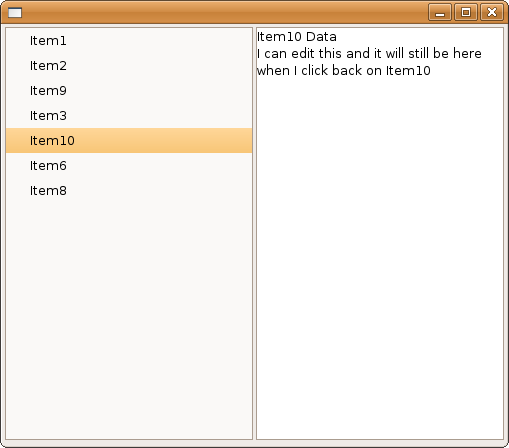
The list is implemented by a tree. You can assign your own custom data type to each treeItem. You can create new items with a right-click pop-up menu. You can delete or drag and drop any item in the tree. Your custom data associated with the treeItem will be meticulously preserved. You can update the data in the view on the right and the changes will be synced back to your custom data type in the selected treeItem - automatically.
It's not all that surprising that more templates like this aren't available. It was rather difficult to but together. But there was lots of resources that went into making this possible. Many elements in this code are based on examples taken from: www.java2s.com
/*
* Basic template for app with left hand tabs
* and custom pane on right
* by clay.dot.gerrard.at.gmail.dot.com
*/
import java.io.ByteArrayInputStream;
import java.io.ByteArrayOutputStream;
import java.io.DataInputStream;
import java.io.DataOutputStream;
import java.io.IOException;
import org.eclipse.swt.SWT;
import org.eclipse.swt.widgets.Composite;
import org.eclipse.swt.widgets.Display;
import org.eclipse.swt.widgets.Event;
import org.eclipse.swt.widgets.Listener;
import org.eclipse.swt.widgets.Menu;
import org.eclipse.swt.widgets.MenuItem;
import org.eclipse.swt.widgets.Shell;
import org.eclipse.swt.widgets.Text;
import org.eclipse.swt.widgets.Tree;
import org.eclipse.swt.widgets.TreeItem;
import org.eclipse.swt.graphics.Point;
import org.eclipse.swt.graphics.Rectangle;
import org.eclipse.swt.widgets.MessageBox;
import org.eclipse.swt.dnd.*;
import org.eclipse.swt.layout.*;
public class LeftTabs {
// left hand "tab" tree
static Tree tree;
// right hand viewer
static CompositePane view;
// temporary TreeItem used to hold data during Drag & Drop
static TreeItem sourceTreeItem;
// keep track of number of treeItems created
static int count = 1;
public static void main(String[] args) {
// setup the display & shell & layout
final Display display = new Display();
final Shell shell = new Shell(display);
FillLayout fillLayout = new FillLayout();
// columns
fillLayout.type = SWT.HORIZONTAL;
// break 'em up a little
fillLayout.spacing = 3;
fillLayout.marginHeight = 3;
shell.setLayout(fillLayout);
// And here's the tree
tree = new Tree(shell, SWT.BORDER);
// filled with some data
for (int i = 1; i <= 3; i++) {
TreeItemData myData = new TreeItemData();
myData.Name = "Item" + i;
myData.field1 = myData.Name + " Data";
TreeItem item = new TreeItem(tree, SWT.NONE);
count++;
item.setText(myData.Name);
item.setData(myData);
}
// And here's the right hand pane
view = new CompositePane(shell);
// right click menu on the tree
tree.addListener(SWT.MenuDetect, new Listener() {
public void handleEvent(Event event) {
Menu menu = new Menu(shell, SWT.POP_UP);
// NEW ITEM
MenuItem item_new = new MenuItem(menu, SWT.PUSH);
item_new.setText("New Item");
// when click "New Item", add an item to tree
item_new.addListener(SWT.Selection, new Listener() {
public void handleEvent(Event e) {
TreeItem[] selection = tree.getSelection();
int index;
if (selection.length != 0)
index = tree.indexOf(selection[0]) + 1;
else
index = 0;
TreeItem item = new TreeItem(tree, SWT.NONE, index);
TreeItemData myData = new TreeItemData();
myData.Name = "Item" + count++;
myData.field1 = myData.Name + " Data";
item.setText(myData.Name);
item.setData(myData);
view.setData((TreeItemData) item.getData());
tree.setSelection(item);
}
}); // end item_new event
// DELETE ITEM
MenuItem item_delete = new MenuItem(menu, SWT.PUSH);
item_delete.setText("Delete Item");
// when click "Delete Item", delete selected item
item_delete.addListener(SWT.Selection, new Listener() {
public void handleEvent(Event e) {
TreeItem[] selection = tree.getSelection();
int index = tree.indexOf(selection[0]);
for (int i=0; i < selection.length; i++){
selection[i].dispose();
}
// item deleted need new selection
TreeItem[] items = tree.getItems();
if (items.length != 0) {
if (index > items.length-1) {
// it would be better to select an item closer to the deleted item?
view.setData((TreeItemData) items[items.length-1].getData());
tree.setSelection(items[items.length-1]);
} else {
view.setData((TreeItemData) items[index].getData());
tree.setSelection(items[index]);
}
}
}
}); // end item_delete
menu.setLocation(event.x, event.y);
menu.setVisible(true);
while (!menu.isDisposed() && menu.isVisible()) {
if (!display.readAndDispatch())
display.sleep();
}
menu.dispose();
}
}); // end right click menu
// when a new treeItem is selected, update the view
tree.addListener(SWT.Selection, new Listener() {
public void handleEvent(Event event)
{
view.setData((TreeItemData) event.item.getData());
}
}); // end update view with tree item data
// when the tree looses focus make sure things are in order
tree.addListener(SWT.FocusOut, new Listener() {
public void handleEvent(Event event) {
TreeItem[] selection = tree.getSelection();
// no item selected - view data is ambigous, possible data loss
if (selection.length == 0) {
MessageBox messageBox = new MessageBox(shell, SWT.ICON_ERROR);
messageBox.setText("Possible Loss of Data.");
messageBox.setMessage("Think about what you did to cause the view data and the tree selection to get out of sync, and decide how you want your program to behave!");
messageBox.open();
//*/
TreeItem[] items = tree.getItems();
if (items.length != 0) {
view.setData((TreeItemData) items[0].getData());
tree.setSelection(items[0]);
} else {
// no items in view?! you can't delete the last item...
TreeItemData myData = new TreeItemData();
myData.Name = "Item" + count++;
myData.field1 = myData.Name + " Data";
TreeItem item = new TreeItem(tree, SWT.NONE);
item.setText(myData.Name);
item.setData(myData);
view.setData((TreeItemData) item.getData());
tree.setSelection(item);
}
//*/
}
}
}); // end tree loose focus
// setup DragSource
DragSource source = new DragSource(tree, DND.DROP_COPY);
source.setTransfer(new Transfer[] { TreeItemDataTransfer.getInstance() });
source.addDragListener(new DragSourceAdapter() {
public void dragStart(DragSourceEvent event) {
TreeItem[] selection = tree.getSelection();
if (selection.length > 0 && selection[0].getData() != null) {
event.doit = true;
sourceTreeItem = selection[0];
} else {
event.doit = false;
}
} // end dargStart
public void dragSetData(DragSourceEvent event) {
if (TreeItemDataTransfer.getInstance().isSupportedType(event.dataType))
event.data = sourceTreeItem.getData();
} // end dargSetData
public void dragFinished(DragSourceEvent event) {
if (event.doit) {
sourceTreeItem.dispose();
}
sourceTreeItem = null;
} // end dragFinished
}); // end DragSource
// setup DropTarget
DropTarget target = new DropTarget(tree, DND.DROP_COPY);
target.setTransfer(new Transfer[] {TreeItemDataTransfer.getInstance() });
target.addDropListener(new DropTargetAdapter() {
public void dragEnter(DropTargetEvent event) {
event.detail = DND.DROP_COPY;
} // end dragEnter
public void dragOver(DropTargetEvent event) {
event.feedback = DND.FEEDBACK_SCROLL;
// if the drop target is a specific item in the tree
if (event.item != null) {
TreeItem item = (TreeItem) event.item;
Point pt = display.map(null, tree, event.x, event.y);
Rectangle bounds = item.getBounds();
// give visual cue of drop location to user
if (pt.y < bounds.y + bounds.height/2) {
event.feedback |= DND.FEEDBACK_INSERT_BEFORE;
} else {
event.feedback |= DND.FEEDBACK_INSERT_AFTER;
}
} else {
// set event.item to last item in list & set feedback to after
}
} // end dragOver
public void drop(DropTargetEvent event) {
try {
if (event.data == null) {
event.detail = DND.DROP_NONE;
return;
}
TreeItem newItem;
// if the dropTarget is a specific item in the tree
if (event.item != null) {
TreeItem selection = (TreeItem) event.item;
Point pt = display.map(null, tree, event.x, event.y);
Rectangle bounds = selection.getBounds();
//TreeItem[] items = tree.getItems();
// find index of selection
int index = tree.indexOf(selection);
// insert newItem at index
if (pt.y < bounds.y + bounds.height/2) {
// insert before
newItem = new TreeItem(tree, SWT.NONE, index);
} else {
// insert after
newItem = new TreeItem(tree, SWT.NONE, index+1);
}
} else {
// no specific item selected, drop at the end
newItem = new TreeItem(tree, SWT.NONE);
}
TreeItemData myType = (TreeItemData) event.data;
newItem.setText(myType.Name);
newItem.setData(myType);
// set selection otherwise view data gets out of sync
tree.setSelection(newItem);
} catch (RuntimeException e) {
e.printStackTrace();
}
} // end drop
}); // end DropTarget
// write view data back to tree - see CompositePane.Update()
tree.addListener(SWT.Arm, new Listener() {
public void handleEvent(Event event) {
tree.getSelection()[0].setData((TreeItemData) view.getData());
}
});
// wrap it up
shell.open();
while (!shell.isDisposed()) {
if (!display.readAndDispatch())
display.sleep();
}
display.dispose();
}
} // class LeftTabs
class TreeItemData {
// all the data to be held by each treeItem
String Name;
String field1;
} // new members must be explicitly handled in nativeToJava & javaToNative
// Transfer class for handling DND of TreeItemData
class TreeItemDataTransfer extends ByteArrayTransfer {
private static final String TreeItemData_TRANSFER_NAME = "TreeItemData_TRANSFER";
private static final int TreeItemData_TRANSFER_ID = registerType (TreeItemData_TRANSFER_NAME);
private static TreeItemDataTransfer instance = new TreeItemDataTransfer();
public static TreeItemDataTransfer getInstance() {
return instance;
}
protected String[] getTypeNames() {
return new String[] { TreeItemData_TRANSFER_NAME };
}
protected int[] getTypeIds() {
return new int[] {TreeItemData_TRANSFER_ID};
}
public void javaToNative (Object object, TransferData transferData) {
if (object == null || !(object instanceof TreeItemData))
return;
TreeItemData myType = (TreeItemData) object;
if (isSupportedType(transferData)) {
try {
ByteArrayOutputStream stream = new ByteArrayOutputStream();
DataOutputStream out = new DataOutputStream(stream);
// write out each member in your custom dataType
out.writeUTF(myType.Name);
out.writeUTF(myType.field1);
out.close();
super.javaToNative(stream.toByteArray(), transferData);
} catch (IOException e) {
e.printStackTrace();
}
}
} // end javaToNative
public Object nativeToJava (TransferData transferData) {
if (isSupportedType(transferData)) {
byte[] buffer = (byte[]) super.nativeToJava(transferData);
if (buffer == null)
return null;
TreeItemData myType = new TreeItemData();
try {
ByteArrayInputStream stream = new ByteArrayInputStream(buffer);
DataInputStream in = new DataInputStream(stream);
// read in each member in your custom dataType
myType.Name = in.readUTF();
myType.field1 = in.readUTF();
in.close();
} catch (IOException e) {
e.printStackTrace();
return null;
}
return myType;
} else {
return null;
}
} // end nativetoJava
} // end TreeItemDataTransfer
// Composite widget for defining the right hand "view"
class CompositePane extends Composite {
// local TreeItemData, to keep track of changes
static TreeItemData viewData;
// declarations of pane view widgets
static Text text;
public CompositePane (Composite c) {
// setup layout of the pane
super(c, SWT.NONE);
this.setLayout(new FillLayout());
// put widgets in the pane
text = new Text(this, SWT.BORDER | SWT.MULTI | SWT.WRAP);
// add a loose focus listener to EVERY *EDITABLE* widget
text.addListener(SWT.Deactivate, new Listener()
{
public void handleEvent(Event event)
{
// sync changes in view back to dataum
Update();
}
});
} // CompositePane constructor
public void setData (TreeItemData n)
{
viewData = n;
// populate the pane's elements with the viewData
text.setText(viewData.field1);
}
// update viewData, then notify listener that it should sync to the tree
public void Update() {
viewData.field1 = text.getText();
this.notifyListeners(SWT.Modify, new Event());
}
public TreeItemData getData()
{
return viewData;
}
} // class CompositePane
I'm not happy with my options for displaying code in google blogger, and more than a little disappointed in this temporary solution. Expect a blog post to come out of that. I'm also trying to work on a secure crossplatform Snergy config that's giving me trouble so it may be worth a post.
Saturday, February 16, 2008
how to delete last command from bash history
If you have ever typed something into a command prompt that you wished you hadn't - you may find it useful to know that you can delete it from ~/.bash_history very easily.
The command:
# history
1 cd
2 history
3 ls -alhF
4 history
5 wget username:password@private.ftp.com/secret/file.tar.gz
6 history
so to delete the wget command (which contains a password) - just use:
history -d 5
# history -d 5
# history
1 cd
2 history
3 ls -alhF
4 history
5 history
6 history -d 5
7 history
This is (hopefully) the final update to an OLD post. Sorta "pre-StackOverflow" internet.
Checkout this question instead:
http://superuser.com/questions/384366/remove-a-certain-line-from-bash-history-file
^posted in the comments
The below is preserved only for hysterical accuracy
But suppose you KNOW you're about to enter a command you don't want to go into history. It'd be nice if you could just tack a little "hideme" modifer onto the front or tail of your command and be done with it. Unfortunately from what I've been able to google there is no such feature built into history or bash.
Naturally I made one.
TMP=$(history | tail -1 | awk '{print $1}') && history -d $TMP && \
paste_in_shell_and_replace_this_with_whatever_you_want_to_hide
And naturally someone smarter than me came along and found a better way to do it - THANKFULLY they posted a comment here to help us out (thanks Mitch!):
history -d $((HISTCMD-1)) && \
paste_in_shell_and_replace_this_with_whatever_you_want_to_hide
Rather than holding down backspace, you may find it useful to know that in bash Ctrl-W will delete from the cursor to the beginning of the previous word.
What I don't get, is that according man bash HISTCMD should be the CURRENT history number:
and yet in ALL my tests $HISTCMD is the "index in the history list, of the current command" +1
But it can still lead to two two useful aliases:
alias hideme='history -d $((HISTCMD-1))'
alias hideprev='history -d $((HISTCMD-2)) && history -d $((HISTCMD-1))'
Dig the sneaky:
# history
1 cd
2 history
3 ls -alhF
4 history
5 history
6 history -d 5
7 history
8 vi .bashrc
9 history
# echo password && hideme
password
# echo password
password
# hideprev# history
1 cd
2 history
3 ls -alhF
4 history
5 history
6 history -d 5
7 history
8 vi .bashrc
9 history
10 history
I know the blog's kinda been on Linux kick lately - some of that is coming from the new job - I'm using Linux more. But, I've been working on a little project in Eclipse - Java/SWT - and I'm getting to a point where I may have some useful learnings to post coming out of that. Or maybe not...
Internet Tablet, and all my xbox's are running fine...
I'd like to throw out some props to Ivie for sending me an email about one of my posts that she read. I try to post stuff that I myself have trouble finding out there on the interwebz - so it's always nice to hear from someone that finds it useful - thanks Ivie!
The command:
- history -d offset
# history
1 cd
2 history
3 ls -alhF
4 history
5 wget username:password@private.ftp.com/secret/file.tar.gz
6 history
so to delete the wget command (which contains a password) - just use:
history -d 5
# history -d 5
# history
1 cd
2 history
3 ls -alhF
4 history
5 history
6 history -d 5
7 history
This is (hopefully) the final update to an OLD post. Sorta "pre-StackOverflow" internet.
Checkout this question instead:
http://superuser.com/questions/384366/remove-a-certain-line-from-bash-history-file
^posted in the comments
The below is preserved only for hysterical accuracy
But suppose you KNOW you're about to enter a command you don't want to go into history. It'd be nice if you could just tack a little "hideme" modifer onto the front or tail of your command and be done with it. Unfortunately from what I've been able to google there is no such feature built into history or bash.
Naturally I made one.
TMP=$(history | tail -1 | awk '{print $1}') && history -d $TMP && \
paste_in_shell_and_replace_this_with_whatever_you_want_to_hide
And naturally someone smarter than me came along and found a better way to do it - THANKFULLY they posted a comment here to help us out (thanks Mitch!):
history -d $((HISTCMD-1)) && \
paste_in_shell_and_replace_this_with_whatever_you_want_to_hide
Rather than holding down backspace, you may find it useful to know that in bash Ctrl-W will delete from the cursor to the beginning of the previous word.
What I don't get, is that according man bash HISTCMD should be the CURRENT history number:
HISTCMD
The history number, or index in the history list, of the current command.
and yet in ALL my tests $HISTCMD is the "index in the history list, of the current command" +1
But it can still lead to two two useful aliases:
alias hideme='history -d $((HISTCMD-1))'
alias hideprev='history -d $((HISTCMD-2)) && history -d $((HISTCMD-1))'
Dig the sneaky:
# history
1 cd
2 history
3 ls -alhF
4 history
5 history
6 history -d 5
7 history
8 vi .bashrc
9 history
# echo password && hideme
password
# echo password
password
# hideprev# history
1 cd
2 history
3 ls -alhF
4 history
5 history
6 history -d 5
7 history
8 vi .bashrc
9 history
10 history
I know the blog's kinda been on Linux kick lately - some of that is coming from the new job - I'm using Linux more. But, I've been working on a little project in Eclipse - Java/SWT - and I'm getting to a point where I may have some useful learnings to post coming out of that. Or maybe not...
Internet Tablet, and all my xbox's are running fine...
I'd like to throw out some props to Ivie for sending me an email about one of my posts that she read. I try to post stuff that I myself have trouble finding out there on the interwebz - so it's always nice to hear from someone that finds it useful - thanks Ivie!
Saturday, January 26, 2008
ubuntu disable hardware
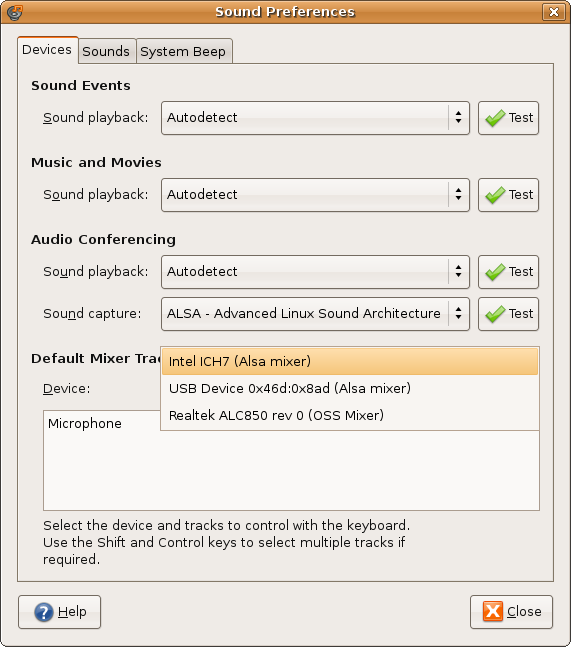
I had a second sound card that kept getting picked up by apps under ubuntu as my primary audio device. In windows I sometimes use the game port on this pci sound card, but in general I don't even care if Linux detects it.
In ubuntu gnome, under System->Preferences->Sound
I had something like this:

In an unrelated effort, I had only recently discovered an important linux command - lsmod
The command list modules will display information about all loaded kernel modules. Kernel modules are dynamically loaded kernel functions, such as a device driver.
When I looked through the list of loaded kernel modules on my system:
snd_ens1370 21536 0
gameport 16776 1 snd_ens1370
snd_ak4531_codec 9856 1 snd_ens1370
snd_pcm 80388 5 snd_ens1370,snd_intel8x0,snd_ac97_codec
There was no doubt in my mind - I needed to stop the kernel from loading the module snd_ens1370.
I had considered just deleting it all together:
$ locate 1370
/lib/modules/2.6.22-14-generic/kernel/sound/pci/snd-ens1370.ko
/usr/src/linux-headers-2.6.22-14-generic/include/config/snd/ens1370.h
/usr/share/alsa/cards/ENS1370.conf
But it turns out there is a more elegant way.
To disable hardware in ubuntu - blacklist the module.
Take a look at, /etc/modprobe.d/blacklist
To disable my Ensoniq sound card in ubuntu - I added the following lines:

In ubuntu gnome, under System->Preferences->Sound
I had something like this:
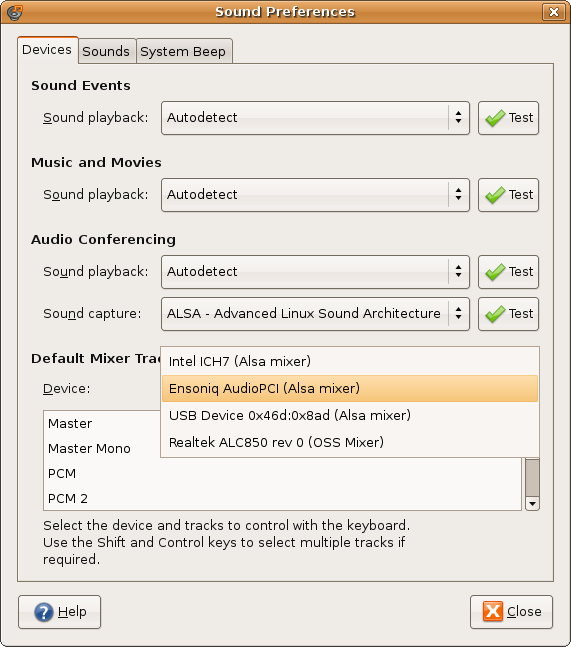
In an unrelated effort, I had only recently discovered an important linux command - lsmod
The command list modules will display information about all loaded kernel modules. Kernel modules are dynamically loaded kernel functions, such as a device driver.
When I looked through the list of loaded kernel modules on my system:
lsmod | lessI found this:
snd_ens1370 21536 0
gameport 16776 1 snd_ens1370
snd_ak4531_codec 9856 1 snd_ens1370
snd_pcm 80388 5 snd_ens1370,snd_intel8x0,snd_ac97_codec
There was no doubt in my mind - I needed to stop the kernel from loading the module snd_ens1370.
I had considered just deleting it all together:
$ locate 1370
/lib/modules/2.6.22-14-generic/kernel/sound/pci/snd-ens1370.ko
/usr/src/linux-headers-2.6.22-14-generic/include/config/snd/ens1370.h
/usr/share/alsa/cards/ENS1370.conf
But it turns out there is a more elegant way.
To disable hardware in ubuntu - blacklist the module.
Take a look at, /etc/modprobe.d/blacklist
To disable my Ensoniq sound card in ubuntu - I added the following lines:
# disable my PCI ensoniq sound cardthen just reboot...
blacklist snd_ens1370
Wednesday, January 16, 2008
how does bash work
When evoked the Borne Again Shell can launch one of two different types of interactive shells, login or non-login.
These descriptions are based on my experiences with a variety of Debian & Fedora based environments - each has their own peculiarities in their implementation of bash. I'll do my best to be "generic"
When you login via tty, ssh, or su --login - your $SHELL is launched for you. This is called a "login" shell, and it will automatically source the following files:
It is VERY common for ~/.profile (or ~/.bash_profile) to source ~/.bashrc by either:
/etc/profile may source lots of other files. Sometimes /etc/bashrc (or /etc/bash.bashrc) and sometimes even ~/.bashrc - so watch out!
Your system may not have all these files - or they may have different names. Try:
the command "su -" is short hand for "su --login root" or "switch user to root and launch a login shell"
it is NOT "switch to super user and load environment variables" (even if that may be the case on some systems)
These descriptions are based on my experiences with a variety of Debian & Fedora based environments - each has their own peculiarities in their implementation of bash. I'll do my best to be "generic"
When you login via tty, ssh, or su --login - your $SHELL is launched for you. This is called a "login" shell, and it will automatically source the following files:
1) /etc/profilethen
2) ~/.profile or ~/.bash_profileWhen you launch /bin/bash by some other means (xterm, konsole, su, or even typing /bin/bash) it is considered non-login and it WILL source .bashrc
(but generally not both, one will take "precedence")
It is VERY common for ~/.profile (or ~/.bash_profile) to source ~/.bashrc by either:
. ~/.bashrcor
source ~/.bashrcYou can use source either way - in both interactive and non-interactive shells.
/etc/profile may source lots of other files. Sometimes /etc/bashrc (or /etc/bash.bashrc) and sometimes even ~/.bashrc - so watch out!
Your system may not have all these files - or they may have different names. Try:
ls -al /etc/ | grep bashrcto get some different ideas.
ls -al /etc/ | grep profile
ls -al ~ | grep bashrc
ls -al ~ | grep profile
the command "su -" is short hand for "su --login root" or "switch user to root and launch a login shell"
it is NOT "switch to super user and load environment variables" (even if that may be the case on some systems)
Saturday, January 5, 2008
3RLOD Error 0020 X Clamp Replacement
And so, it was my turn:

For a used 360, I'm actually pretty happy it lasted as long as it did. Manufacture date was 2/06 - so there's nothing holding me back now.
Funny thing, this is actually how my FIRST xbox got modded. When it broke, it was out of warranty, so I had nothing keeping me from opening it up. XBMC is the best thing I ever did for my entertainment center.
In this case the interwebz says I need an X-Clamp Replacement - so you know... whatever.
I went with RBJ's MKIII method. Which is extremely well documented, so I didn't really take many pictures. (Update: Last I checked RBJ had taken down his tutorial, which is too bad - I sent him a message. Lamma has a good one up, which is essentially the same thing. However, it should be noted I did NOT buy the kit he's selling - although I'm sure it's worth every penny - you can get the parts anywhere. It's the work of removing the x-clamp, not the tools/equipment you use, that fixes your xbox.)
I used the following hardware from Lowe's:
2 packs - M5-.8x20mm - Oval Head Phillips - Sales # 138573 - $.92 each pack (Qty:2)
2 packs - M5-.8x16mm - Oval Head Phillips - Sales # 138566 - $.68 each pack (Qty:2)
5 packs - 5mm Flat Washers - Part # 138319 - $.56 each pack (Qty:10)

I spent probably more time than I should have cleaning the old thermal paste off the chips & heat sinks. Goo-Gone and 99% alcohol. Then I used a razor to spread a very thin even layer of some generic thermal paste on the CPU and GPU. I just used what I had lying around instead of the "artic silver" stuff everyone talks about.
Drilling the holes in the case was surprisingly pretty easy - I used a 1/4" bit for a pilot hole, then opened it up to 3/8's. Using the tape to hold the bolts in place while I got the board in place also went pretty smooth.
I accidentally screwed the CPU head sink down backward on my first try putting things back together (heat tube AWAY from the GPU) - but once I got everything screwed down... It booted up on the first try - green lights all around.
Been running great for 3 days - posted success.
BTW, I start the new job @ Rackspace on Monday.

For a used 360, I'm actually pretty happy it lasted as long as it did. Manufacture date was 2/06 - so there's nothing holding me back now.
Funny thing, this is actually how my FIRST xbox got modded. When it broke, it was out of warranty, so I had nothing keeping me from opening it up. XBMC is the best thing I ever did for my entertainment center.
In this case the interwebz says I need an X-Clamp Replacement - so you know... whatever.
I went with RBJ's MKIII method. Which is extremely well documented, so I didn't really take many pictures. (Update: Last I checked RBJ had taken down his tutorial, which is too bad - I sent him a message. Lamma has a good one up, which is essentially the same thing. However, it should be noted I did NOT buy the kit he's selling - although I'm sure it's worth every penny - you can get the parts anywhere. It's the work of removing the x-clamp, not the tools/equipment you use, that fixes your xbox.)
I used the following hardware from Lowe's:
2 packs - M5-.8x20mm - Oval Head Phillips - Sales # 138573 - $.92 each pack (Qty:2)
2 packs - M5-.8x16mm - Oval Head Phillips - Sales # 138566 - $.68 each pack (Qty:2)
5 packs - 5mm Flat Washers - Part # 138319 - $.56 each pack (Qty:10)

I spent probably more time than I should have cleaning the old thermal paste off the chips & heat sinks. Goo-Gone and 99% alcohol. Then I used a razor to spread a very thin even layer of some generic thermal paste on the CPU and GPU. I just used what I had lying around instead of the "artic silver" stuff everyone talks about.
Drilling the holes in the case was surprisingly pretty easy - I used a 1/4" bit for a pilot hole, then opened it up to 3/8's. Using the tape to hold the bolts in place while I got the board in place also went pretty smooth.
I accidentally screwed the CPU head sink down backward on my first try putting things back together (heat tube AWAY from the GPU) - but once I got everything screwed down... It booted up on the first try - green lights all around.
Been running great for 3 days - posted success.
BTW, I start the new job @ Rackspace on Monday.
Friday, December 21, 2007
Reset BIOS password on an IBM Thinkpad T23
I had really hoped I could reset the supervisor password on a spare IBM T23 laptop we had around the office by - disconnecting the CMOS battery or shorting a jumper. Anything besides the procedure described on sodoityourself.com
But apparently there's no way to "reset it" you just have to build yourself a "testpoint" jig and read the encrypted data directly off the EEPROM connected to the main board.
So I picked up a few parts from RadioShack and went to work. BTW, The password turned out to be XPBIOS.

But, I feel it's important to note, I'm an idiot.
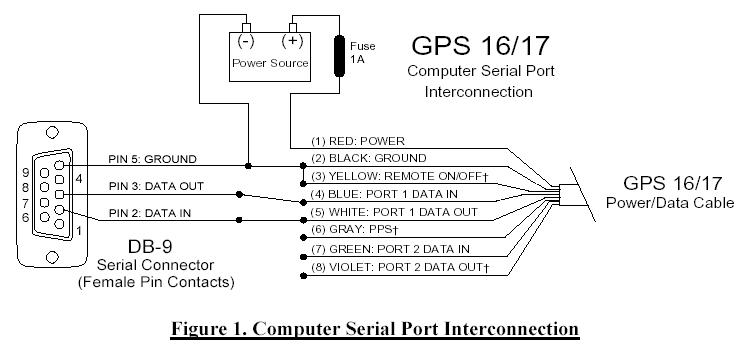
The image you see above here is NOT of a working cable. It is in-fact the improperly constructed cable which was later rebuilt and used to successfully dump the contents of the actmel eeprom on the IBM Thinkpad.
Apparently there isn't much standardization to diagramming a serial connector. It's hard to tell if the flat picture you're looking at is supposed to be a male or female connection. And even worse - true circuit diagrams will often show the BACK of the connector - i.e. they draw it so you would be looking at where the "wires" are ACTUALLY connecting to the BACK of the connector.
Crazy.
Your only real hope is to know the pin numbers of an rs232 cable. Thankfully, almost ALL diagrams will include pin numbers to specify the orientation of the connector and avoid this type of confusion.
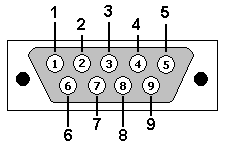
Well... that doesn't help you much if you don't know which pin is which on your cable. So here is a picture of an rs232 / db9 / 9-pin serial cable - with both male and female connectors labeled pin 1, pin 5, pin 6, and pin 9.

Not even wiki has this kind of information...
But apparently there's no way to "reset it" you just have to build yourself a "testpoint" jig and read the encrypted data directly off the EEPROM connected to the main board.
So I picked up a few parts from RadioShack and went to work. BTW, The password turned out to be XPBIOS.

But, I feel it's important to note, I'm an idiot.
The image you see above here is NOT of a working cable. It is in-fact the improperly constructed cable which was later rebuilt and used to successfully dump the contents of the actmel eeprom on the IBM Thinkpad.
Apparently there isn't much standardization to diagramming a serial connector. It's hard to tell if the flat picture you're looking at is supposed to be a male or female connection. And even worse - true circuit diagrams will often show the BACK of the connector - i.e. they draw it so you would be looking at where the "wires" are ACTUALLY connecting to the BACK of the connector.
Crazy.
Your only real hope is to know the pin numbers of an rs232 cable. Thankfully, almost ALL diagrams will include pin numbers to specify the orientation of the connector and avoid this type of confusion.
Well... that doesn't help you much if you don't know which pin is which on your cable. So here is a picture of an rs232 / db9 / 9-pin serial cable - with both male and female connectors labeled pin 1, pin 5, pin 6, and pin 9.

Not even wiki has this kind of information...
Subscribe to:
Posts (Atom)